Setting up for working with digital signature
Terms and definitions
-
Electronic trading platform (ETP) – an automated information system designed to conduct competitive trading procedures in electronic form.
-
Electronic signature (ES) is a detail of an electronic document intended to protect this electronic document from forgery, obtained as a result of cryptographic transformation of information using a private key of an electronic signature and allowing to identify the owner of the signature key certificate, as well as to establish the absence of distortion of information in the electronic document.
-
Electronic document (ED) - a detail of an electronic document intended to protect this electronic document from forgery, obtained as a result of cryptographic transformation of information using a private key of an electronic signature and allowing to identify the owner of the signature key certificate, as well as to establish the absence of distortion of information in the electronic document.
Instructions for setting up the system to work with CryptoPro EDS Browser plug-in
CryptoPro EDS Browser plug-in is designed to create and verify an electronic signature (ES) on web pages using the CryptoPro CSP CIPF.You can download the plugin from the link: https://www.cryptopro.ru/products/cades/plugin/
The plugin can be used in any modern browser that supports JavaScript.
Installation procedure:
-
Open your browser.Go to the ETP website.
-
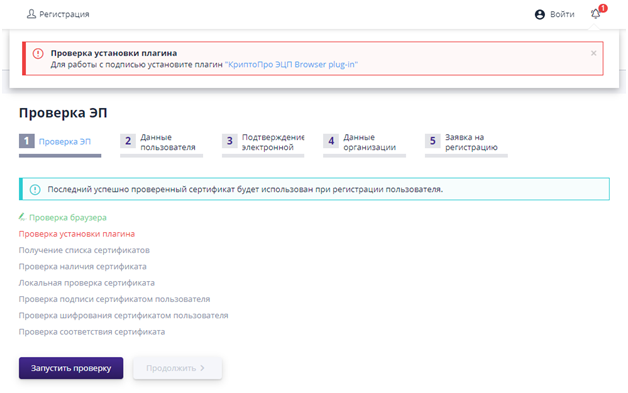
Go to the first step of registration and start checking the electronic signature by clicking on the “Run verification” button.If the component is not installed, an information message will appear in the browser window informing you that it needs to be installed.
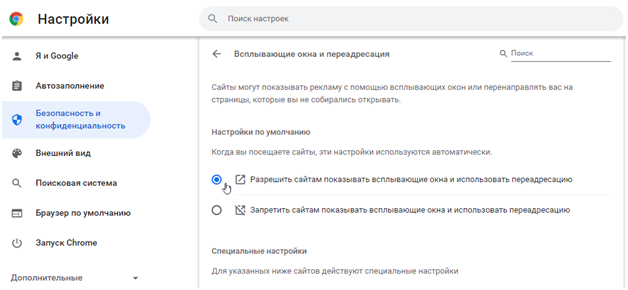
- Check that pop-up blocking is disabled: Open the “Menu” section and select “Settings”.In the window that opens, in the “Security and Privacy” section, go to “Site Settings”.In the "Content" block, select "Pop-ups and redirects."Set "Allow sites to show pop-ups and use redirects."
-
Open your browser and install the plugin.When prompted to make changes on your computer, click the “Yes” button.
-
Launch your browser and check the plugin on the page: https://www.cryptopro.ru/sites/default/files/products/cades/demopage/simple.html
-
After completing the installation of the ActiveX component to work with the signature, you must pass the electronic signature verification.To do this, go to the ETP website, go to the first registration step and click the “Start verification” button.
-
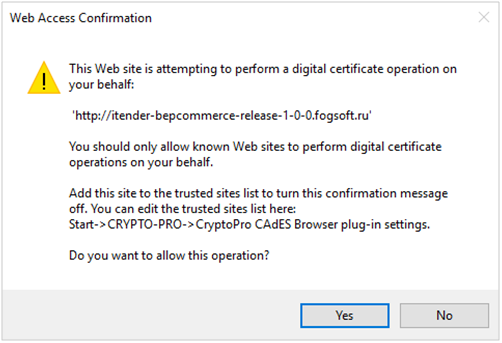
Confirm access:
-
Select a certificate to check; if all checks were successful, you can work with this certificate on the ETP.
-
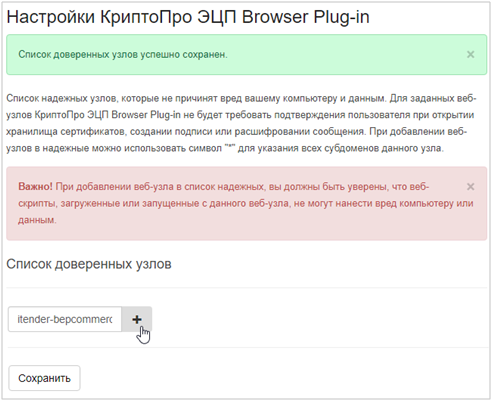
In order to avoid the need to confirm access each time, you should add the ETP to the trusted nodes of Crypto-Pro.To do this, in the "Start" menu, find the folder with Crypto-Pro and follow the link "EDS Browser Plug-in Settings"
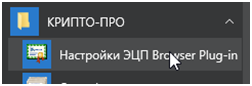
- Add ETP to the list of trusted nodes: