User's personal account
After successful authorization, the user is automatically transferred to "Personal Account" page.
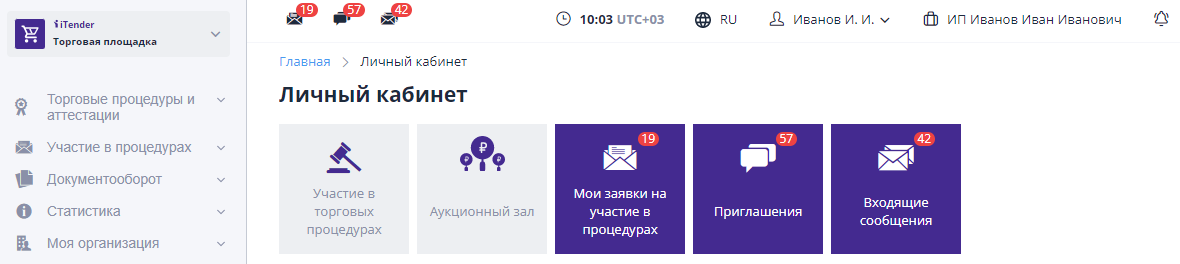
To navigate through sections of the system, you can use the left menu, tiles quick access to magazines, as well as icons in the top menu.Tile color and the presence of a counter indicates that the system has unprocessed events, for example, there is an unread incoming message. If there are no pending events, the tile will not be highlighted.
All important events are displayed as icons in the top menu.When clicked Click the icon to go to the corresponding journal:

The transition between sections of the ETP is carried out using the left menu or breadcrumb at the top of the page:
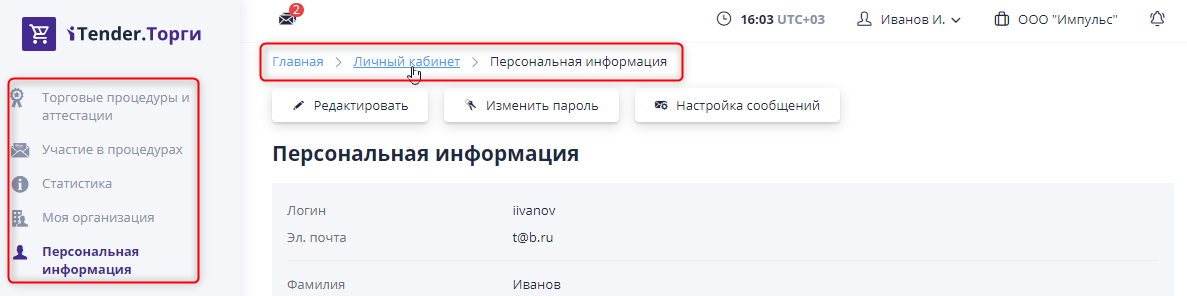
The left menu is available on any ETP page.It can be translated into compact view using the arrow button at the bottom of the page.For To open the menu, you need to click on any area of the compact menu and select the required section.After going to a new menu page again "will collapse."You can remove the “collapsing” using the button in the form arrows at the bottom of the page:

