Certification and tender commissions
This section provides a list of certification and tender commissions organizations.The commissions created in this section are subsequently available on bidding page.To go to the commissions viewing page you must follow the link in the left side menu “Certification and tender commissions":

To view or edit the commission, you must follow the link in name, to create a new one, click the “Add” button:

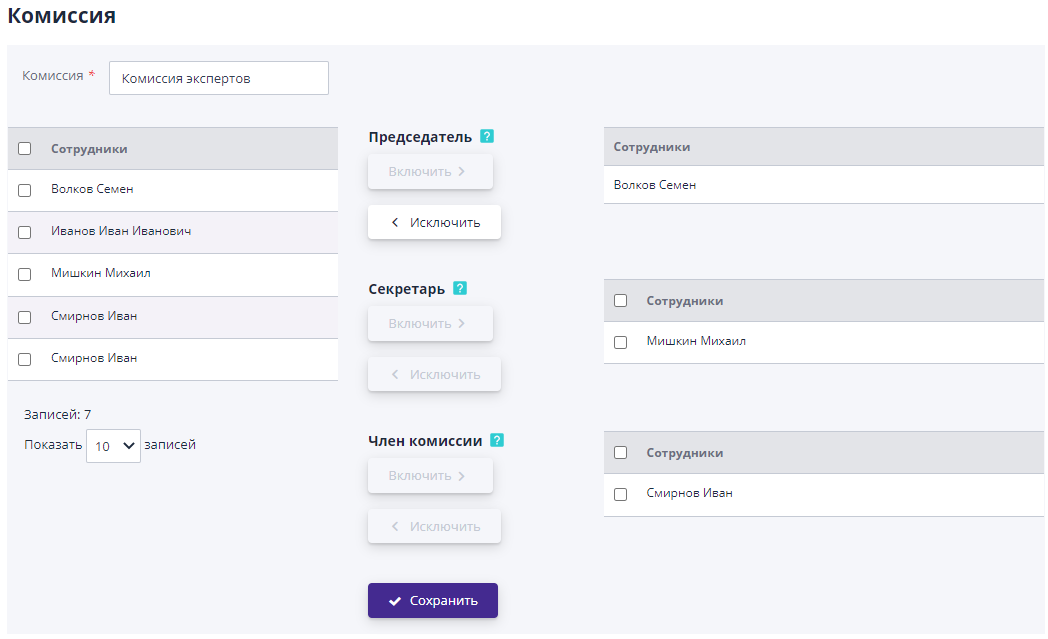
On the left side of the commission page there is a list of employees with a role “Member of the competition commission”, on the right side - the chairman, secretary and members of the current commission.To add an employee to the commission you must select it on the left side and click “Add” next to the role in commissions.To remove an employee from the commission, you must select him in right side and click “Delete”.To save the commission you must indicate its name and add at least one employee to it, for To save the commission, you must click the “Save” button:
To delete a tender commission, you must go to the editing page click “Delete”: