Company Settings
The system allows you to preset settings related to holding the organizer's auction.The default settings will be applied when the work of various sections of the site and during bidding.Set of specified Company settings may differ depending on the site configuration.
Pre-configuration is available for employees in an organization with the role Company administrator.To start working with settings, you should go to the “My Organization” menu section, “Company Settings” subsection.
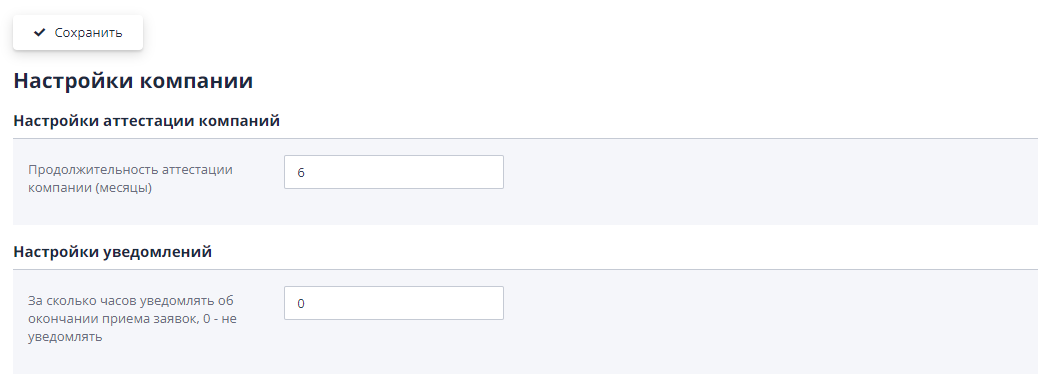
The company settings page is divided into logical blocks, divided by the principle of influence of settings on various sections of the system.
Setting "Duration of company certification (months)" - specifies for how many months to create certification of a company that has passed Certification procedure.
Section "Notification Settings" - contains settings that regulate the receipt of bid notifications by participants.
Setting “How many hours in advance should I notify about the end of accepting applications, 0 - do not notify” - allows you to set how much time before the end the organizer will receive a notification during the application period.
Section "Setting up public contracts" - in this section you can indicate how contracts will be entered into the public journal:
-
Automatically, upon conclusion;
-
Manually, by clicking on the “Create public agreement” button.
Section "Settings of criteria and requirements for documents (default) - [Type of trading procedure]" - in the blocks of this fork you can set criteria and requirements for application documents that will be used by default when creating a trading procedure specified in the second part of the setting name. The number of blocks with settings is determined by the number of available trading procedures for execution.Each block specifies values for different types of trades.
Two settings are available by selecting a value from the drop-down list: “Default criteria group” and “Default application document requirements group”.The drop-down list for selection is formed based on the groups created in the corresponding sections.

If by default no criteria are added to the created trade should not, you should leave the settings empty.
Section "Settings - Online rebidding" - sets how There will be a re-auction bidding process.
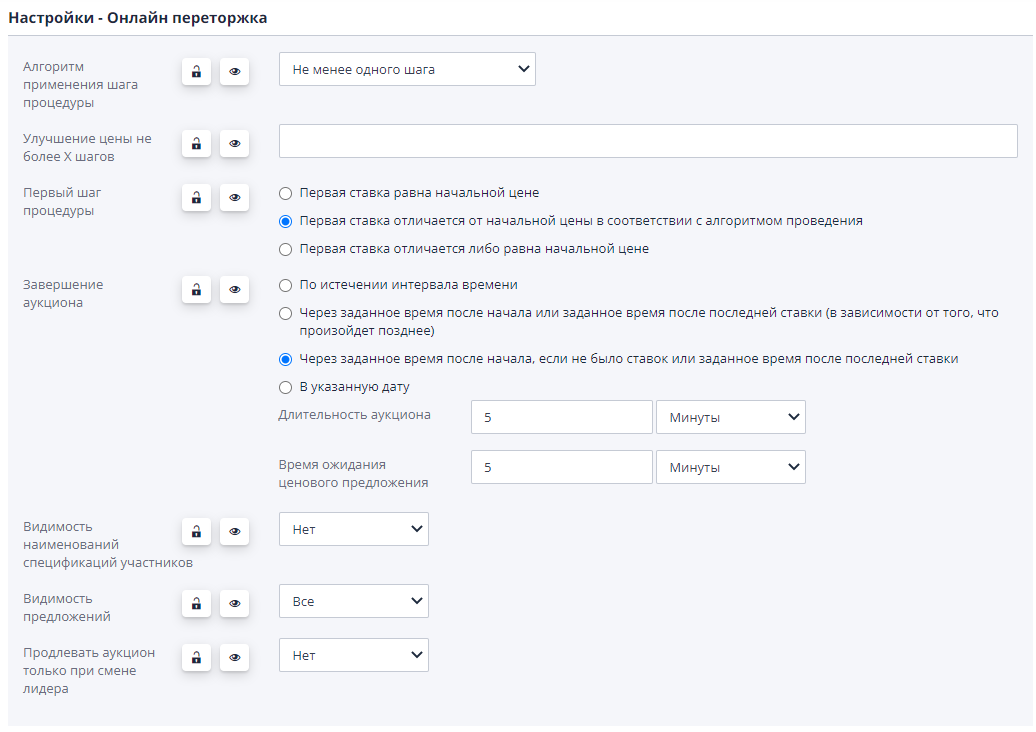
For settings, in addition to setting the value, it is possible to manage them visibility and accessibility of changes in value in ongoing trading procedures.

Button with a padlock icon:
-
In the open position - means that the set value settings will be specified when creating a draft rebidding, but the organizer will be able to change this value.
-
In closed position - means that the organizer will see the value settings, but will not be able to change it in their trading procedures.
Button with an eye icon:
-
Open eye - means that the setting is available for viewing auction organizer.
-
Crossed out eye - means that the setting will not be shown organizer in the rebidding project.
Setting “Algorithm for applying a procedure step” - can be specified in the following meanings:
-
Any bet exceeding the base - the participant can submit any the price offer is different from the initial price, despite specified auction step;
-
Exactly one step - the participant can lower the current offer exactly for one specified auction step;
-
At least one step - the participant can submit any price offer differs from the initial price by an amount greater or equal to the specified auction step;
-
Multiple of a step - the participant can lower the current price offer only by an amount that is a multiple of the specified auction step.
Setting "Price improvement no more than X steps" - allows you to specify the maximum number of steps applied to improve the price.
Setting “First step of procedure” - can be set nextcomfortable meanings:
-
The first bid is equal to the starting price - the participant’s first bid must be equal to the initial price.The system won't allow submit other values.
-
The first bid differs from the starting price in accordance with execution algorithm - the size of the initial price in this value settings are regulated by the “Algorithm for applying the trading step” setting, described above.
-
The first bid is different from or equal to the starting price - first bid can be made at the discretion of the participant or equal to the initial price, or higher than the starting price.
The “Auction End” setting can be set in the following meanings:
-
Upon expiration of the time interval - regardless of availability or If there are no bids from participants, the auction will end after a while, specified in the “Auction Duration” field;
-
After a specified time after the start or a specified time after the last rates (depending on what happens later);
-
After a specified time after the start, if there were no bets or a specified time since the last bet;
-
On the specified date - the end date of trading is set manually.

Auction duration - duration of the trading session in the absence rates.
Auction duration after bid - duration of the trading session after the participant's last bid in the trading session.

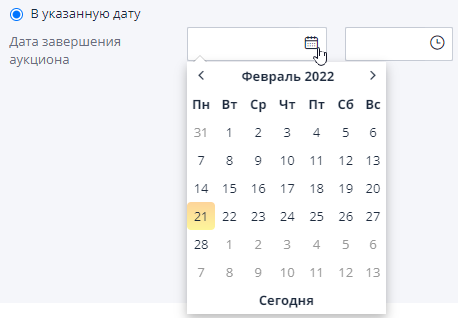
If you select the completion option “On the specified date”, you must fill out field “Auction end date” manually or using a calendar and clock:
Setting "Visibility of participant specification names" - specifies whether participants will see during rebidding names of participants' specifications.
Setting "Offer visibility" - select one of the values:
-
All - the participant is shown everything received during the session offers;
-
Best - only the best of the received offers is shown;
-
Rank - the participant’s rank is shown, that is, his place in the main criterion chosen by the organizer among other participants.
Setting "Extend the auction only when the leader changes" - specifies how the trading session will be extended.In the setting value “no” - the session will be extended with each new arrival sentence, meaning “yes” - the session will be extended only when there is a change leader by rank.
Section "Settings - Down/Up Auction" - sets how There will be an auction bidding process.
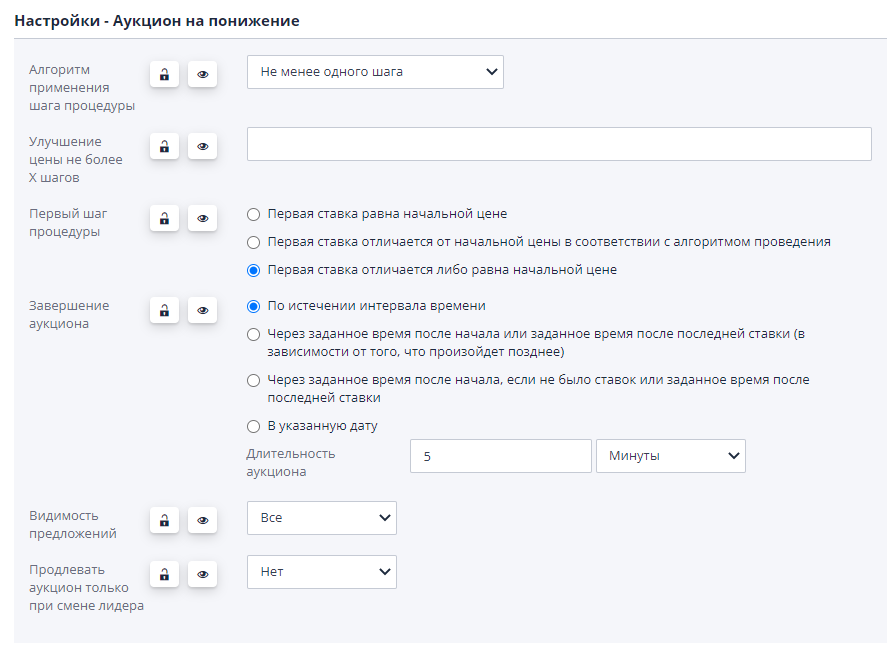
Setting “Algorithm for applying a procedure step” - can be specified in the following meanings:
-
Any bet exceeding the base - the participant can submit any the price offer is different from the initial price, despite specified auction step;
-
Exactly one step - the participant can lower the current offer exactly for one specified auction step;
-
At least one step - the participant can submit any price offer differs from the initial price by an amount greater or equal to the specified auction step;
-
Multiple of a step - the participant can lower the current price offer only by an amount that is a multiple of the specified auction step.
Setting "Price improvement no more than X steps" - allows you to specify the maximum number of steps applied to improve the price.
Setting “First step of procedure” - can be set in the following meanings:
-
The first bid is equal to the starting price - the participant’s first bid must be equal to the initial price.The system won't allow submit other values.
-
The first bid differs from the starting price in accordance with execution algorithm - the size of the initial price in this value settings are regulated by the “Algorithm for applying the trading step” setting, described above.
-
The first bid is different from or equal to the starting price - first bid can be made at the discretion of the participant or equal to the initial price, or higher than the starting price.
The “Auction End” setting can be set in the following meanings:
-
By andafter the time interval has passed - regardless of the availability or If there are no bids from participants, the auction will end after a while, specified in the “Auction Duration” field;
-
After a specified time after the start or a specified time after the last rates (depending on what happens later);
-
After a specified time after the start, if there were no bets or a specified time since the last bet;
-
On the specified date - the end date of trading is set manually.
Auction duration - duration of the trading session in the absence rates.
Auction duration after bid - duration of the trading session after the participant's last bid in the trading session.
If you select the completion option “On the specified date”, you must fill out field “Auction end date” manually or using a calendar and clock:
Setting "Offer visibility" - select one of the values:
-
All - the participant is shown everything received during the session offers;
-
Best - only the best of the received offers is shown;
-
Rank - the participant’s rank is shown, that is, his place in the main criterion chosen by the organizer among other participants.
Setting "Extend the auction only when the leader changes" - specifies how the trading session will be extended.In the setting value “no” - the session will be extended with each new arrival sentence, meaning “yes” - the session will be extended only when there is a change leader by rank.